AVIF vs WebP: Which Image Format Is Better for Websites?
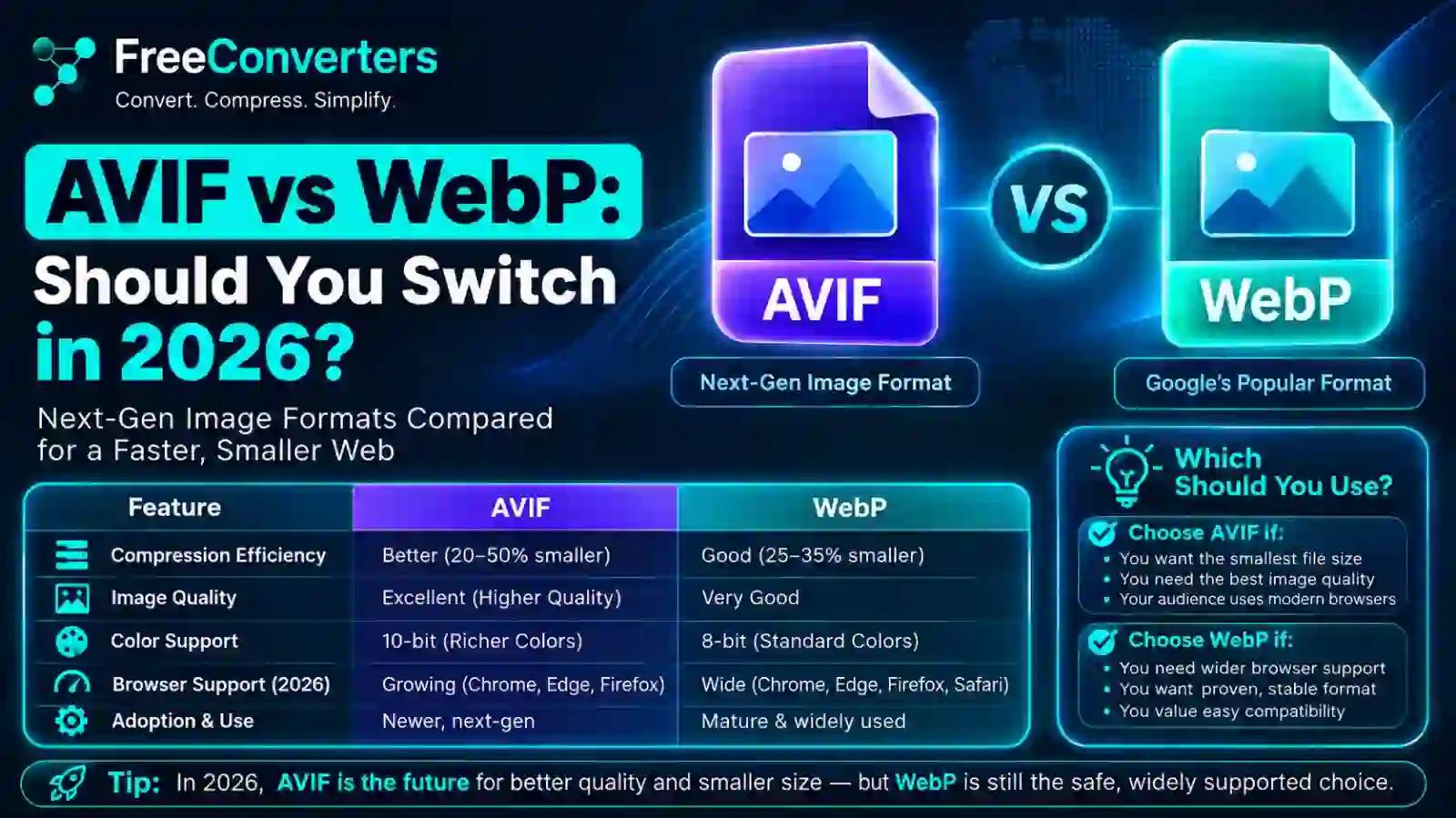
For most websites, WebP remains the safer default in 2026 because of its universal app and CMS compatibility, but AVIF is now genuinely worth switching to for image-heavy sites — photography portfolios, e-commerce galleries, media publications — where the extra 15–25% file size reduction over WebP directly improves Core Web Vitals scores. Browser support for AVIF has closed the gap that held it back for years: global compatibility now sits above 90%, with every major browser rendering it natively.
That said, "should you switch" isn't a single yes-or-no answer — it depends on your CMS, your server's encoding capacity, and how much of your traffic still comes from older devices. This guide breaks down exactly where AVIF wins, where WebP still makes more sense, and how to implement both safely with a proper fallback strategy.
AVIF and WebP: The Quick Comparison
Before going deeper, here's the direct comparison most people are actually looking for.
Aspect: Typical file size vs. JPEG | AVIF: 50–70% smaller | WebP: 25–35% smaller
Aspect: File size vs. each other | AVIF: 15–25% smaller than WebP at similar quality | WebP: Larger than AVIF at similar quality
Aspect: Browser support (2026) | AVIF: ~90–95% global coverage | WebP: ~97%+ global coverage
Aspect: Encoding speed | AVIF: Significantly slower | WebP: Faster
Aspect: Transparency support | AVIF: Yes | WebP: Yes
Aspect: Animation support | AVIF: Yes | WebP: Yes
Aspect: Color depth / HDR | AVIF: Up to 12-bit, HDR support | WebP: 8-bit only, no HDR
Aspect: Best for | AVIF: High-traffic image-heavy sites prioritizing max compression | WebP: General web use needing broad, hassle-free compatibility
The short version: AVIF wins on raw compression and image quality; WebP wins on compatibility and encoding simplicity. Which one matters more depends entirely on your site.
What Is AVIF, Exactly?
AVIF stands for AV1 Image File Format, developed by the Alliance for Open Media (AOM) — the same industry consortium responsible for the AV1 video codec that powers efficient video streaming at services like Netflix and YouTube. AOM released AVIF version 1.0 in February 2019, building the still-image format on top of AV1's video compression technology rather than starting from scratch.
This lineage matters because it explains why AVIF compresses so aggressively. AV1 was engineered specifically to squeeze more visual quality out of fewer bits than its predecessors, and AVIF inherits that efficiency for static and animated images. It's also why AVIF supports features WebP doesn't — HDR (high dynamic range) imagery and 10-bit or 12-bit color depth, both of which matter for photography and video-adjacent content where color accuracy is a real concern, not just a nice-to-have.
How AVIF Compares Technically to WebP
WebP, developed by Google and released back in 2010, was built on the VP8 video codec — an earlier, less efficient compression technology compared to AV1. That generational gap in the underlying codec is the core reason AVIF consistently produces smaller files than WebP at comparable visual quality, typically in the 15–25% range depending on image content.
Where WebP still holds an edge is encoding speed and computational simplicity. AVIF's superior compression comes at a real cost: encoding AVIF images takes meaningfully longer than encoding WebP, which matters if you're processing large volumes of images on your own server rather than through a CDN with built-in image optimization.
Browser Support in 2026: Has AVIF Finally Caught Up?
This is the question that's actually decided whether AVIF is production-ready, and the answer has shifted significantly over the past few years. For a long time, Safari was the holdout that kept AVIF from being a safe default choice — but that changed with Safari 16.4 in March 2023, which added full AVIF support including animation.
As of 2026, current browser support looks like this:
- Chrome — supported since Chrome 85 (August 2020)
- Firefox — supported since Firefox 93 (October 2021)
- Safari — full support (including animation) since Safari 16.4 (March 2023); partial support from Safari 16 onward
- Edge — supported since Edge 121
- Opera — supported since Opera 71
- Samsung Internet — supported since version 14
Global compatibility estimates from caniuse.com put AVIF coverage in the 90–95% range as of early 2026, depending on your audience's device mix. The remaining gap is concentrated almost entirely in older iOS devices (iPhones stuck on iOS 15 or earlier, which can't upgrade), pre-Ventura macOS Safari, and legacy Android browsers on lower-end devices. For most consumer-facing sites in North America and Europe, that unsupported slice represents well under 10% of traffic — which is exactly why a proper fallback (covered below) makes AVIF a safe production choice rather than a risky one.
Where AVIF Support Is Still Patchy
Browser support isn't the whole story — plenty of tools outside the browser haven't caught up. Design software like Figma still lacks native AVIF import/export in many workflows, several email clients render it inconsistently, and older content management systems without an image-optimization plugin may not handle AVIF uploads at all. If you're publishing content across multiple platforms, not just your own website, this gap is worth checking before you commit to AVIF as your only format.
File Size: How Much Smaller Is AVIF, Really?
Numbers here vary by image content — a photo with lots of fine detail compresses differently than a flat-color graphic — but the general pattern holds consistently across benchmarks: AVIF produces files roughly 50% smaller than equivalent-quality JPEGs, and roughly 15–25% smaller than equivalent-quality WebP files.
For a practical sense of what that means: a product photo that's 200KB as a JPEG might come in around 130–150KB as WebP, and around 100–120KB as AVIF. On a page with 20 product images, that difference between WebP and AVIF alone can shave several hundred kilobytes off your total page weight — a meaningful number when every additional 100KB pushes your Largest Contentful Paint (LCP) time upward.
This is precisely why the AVIF-versus-WebP decision isn't purely academic. If your site's page speed score or Core Web Vitals are borderline, the compression gap between these two formats can be the difference that pushes you from "needs improvement" to "good" in Google PageSpeed Insights.
Core Web Vitals: Why This Comparison Actually Matters for SEO
Image format choice isn't just a technical curiosity — it has a direct line to search performance through Core Web Vitals, Google's set of page experience metrics. The metric most affected by image weight is Largest Contentful Paint (LCP), which measures how long it takes for the largest visible element on a page — very often a hero image or featured product photo — to fully render.
It's also worth noting that Google's Core Web Vitals metrics themselves have evolved: Interaction to Next Paint (INP) replaced First Input Delay (FID) as an official Core Web Vital in March 2024, shifting the focus toward measuring overall responsiveness throughout a page's lifecycle rather than just the first interaction. While INP is more about JavaScript responsiveness than image format, it's a reminder that Core Web Vitals is a moving target — and staying current on both the metrics and the formats that improve them is part of ongoing technical SEO, not a one-time fix.
Smaller image files load faster, which directly improves LCP, which is one of the three Core Web Vitals metrics Google factors into page experience signals. For image-heavy sites — e-commerce catalogs, photography portfolios, news sites with large hero images — the switch from WebP to AVIF can produce a measurable LCP improvement without touching a single line of layout code.
Encoding Speed and Server Cost: The Practical Tradeoff
This is the part of the AVIF conversation that generic comparisons tend to skip, and it's genuinely important if you're processing images yourself rather than relying entirely on a CDN.
AVIF's superior compression comes from a computationally intensive encoding process — the algorithm does significantly more work analyzing and compressing each image than WebP's encoder does. In practical terms, encoding a large batch of images to AVIF can take several times longer than encoding the same batch to WebP, which translates into real server cost if you're doing this at scale on your own infrastructure during build time or on-demand.
For most sites, this tradeoff is worth it because encoding happens once, at build or upload time, while the resulting smaller file gets served to every visitor afterward — the compression cost is paid once, and the bandwidth savings compound across every page load. But if you're running a high-volume platform processing thousands of user-uploaded images per day without a CDN handling optimization automatically, that encoding overhead is a legitimate factor to weigh rather than dismiss.
Major CDNs — Cloudflare, Fastly, AWS CloudFront — now handle this problem for you, automatically converting and serving AVIF (or WebP, depending on what the requesting browser supports) through content negotiation based on the browser's Accept header, without you needing to manage the encoding pipeline yourself.
The Fallback Strategy: Serving AVIF, WebP, and JPEG Together
Given that neither AVIF nor WebP has 100% coverage, the correct production approach isn't choosing one exclusively — it's layering both with a JPEG or PNG fallback using the HTML <picture> element. This lets the browser automatically select the best format it supports, without you needing to detect anything server-side.
Here's the standard implementation pattern:
<picture>
<source srcset="photo.avif" type="image/avif" />
<source srcset="photo.webp" type="image/webp" />
<img src="photo.jpg" alt="Description" width="800" height="600" loading="lazy" />
</picture>
The browser evaluates the <source> elements in order and uses the first format it supports. A browser with full AVIF support loads the smallest file; a browser with WebP-only support falls back to that; anything else falls back to the universally-compatible JPEG or PNG in the <img> tag. This pattern gives you AVIF's compression advantage for the majority of visitors while guaranteeing nobody sees a broken image.
If you're not comfortable managing this markup manually, most modern CMS platforms and image CDNs handle it automatically once AVIF support is enabled in settings — WordPress plugins, Shopify's native image pipeline, and most headless CMS image components now support this out of the box.
Should You Switch? A Practical Decision Framework
Rather than a blanket recommendation, here's how to think about it based on your specific situation.
Switch to AVIF if:
- Your site is heavily image-dependent (photography, e-commerce, visual media)
- Your Core Web Vitals scores, particularly LCP, need improvement
- You're using a CDN or image service that handles AVIF encoding automatically
- Your audience skews toward modern browsers and devices
Stick with WebP (for now) if:
- Your CMS or hosting environment doesn't yet support AVIF encoding
- You're processing large image volumes on your own server without CDN-level optimization
- A meaningful share of your traffic comes from older iOS devices or legacy browsers without a fallback system in place
- Your current image weight isn't a bottleneck for your Core Web Vitals scores
Use both, with fallbacks, if:
- You want the best possible compression for supported browsers without sacrificing compatibility for the rest — which, for most production websites in 2026, is genuinely the correct answer rather than a compromise.
AVIF vs WebP for Specific Use Cases
E-commerce product images: AVIF's compression advantage compounds fast when you're loading dozens of product thumbnails per category page — the cumulative bandwidth and LCP savings are significant enough that most product-heavy stores benefit from making the switch, provided their platform supports it.
Blog and content sites: If your pages typically carry one or two featured images rather than dozens, the practical difference between WebP and AVIF is smaller in absolute terms, though still worth capturing if your CMS supports it without extra effort.
Photography portfolios: This is where AVIF's HDR and higher color-depth support genuinely matters beyond just file size — photographers working with rich tonal range benefit from AVIF's technical capabilities in ways a simple compression comparison doesn't fully capture.
Mobile-first websites: Smaller file sizes matter disproportionately on mobile connections, making AVIF's compression edge particularly valuable — though it's worth double-checking your mobile audience's device and browser mix before assuming full coverage.
App icons and UI graphics: For small, simple graphics, the file size difference between WebP and AVIF is often negligible in absolute terms, and WebP's broader tooling support (design software, older CMS plugins) can make it the more practical choice here specifically.
Converting Between Formats
If you're testing AVIF against your current WebP images, or need to convert existing WebP assets for a platform that doesn't yet accept AVIF, a browser-based WebP to PNG converter or WebP to JPG converter gives you a universally compatible starting point to re-encode from, without needing dedicated image software installed locally.
For a broader breakdown of how AVIF, WebP, and older formats stack up feature by feature, this guide on PNG vs JPG vs WebP covers the foundational comparison this article builds on. And if your actual goal is simply reducing page weight regardless of which next-gen format you land on, this practical guide to compressing website images and this one on choosing the right image sizes for your site cover the implementation side in more depth.
Frequently Asked Questions
What is the difference between AVIF and WebP? AVIF is built on the AV1 video codec and typically produces files 15–25% smaller than WebP at comparable quality, while also supporting HDR and higher color depth. WebP, built on the older VP8 codec, has broader compatibility and faster encoding, making it the more universally supported choice.
Is AVIF better than WebP for website performance? For raw compression and Core Web Vitals impact, yes — AVIF's smaller file sizes directly improve Largest Contentful Paint on image-heavy pages. WebP remains competitive for sites where compatibility and simpler encoding matter more than squeezing out the last percentage of file size reduction.
Do all browsers support AVIF in 2026? No, but coverage is high — approximately 90–95% of global browser traffic supports AVIF natively as of 2026, including all major browsers (Chrome, Firefox, Safari 16.4+, Edge, Opera). The remaining gap is mostly older iOS devices and legacy browsers, which is why a JPEG or WebP fallback is still recommended.
Which format has smaller file sizes, AVIF or WebP? AVIF produces smaller files than WebP in the vast majority of cases, typically 15–25% smaller at comparable visual quality, thanks to its more advanced AV1-based compression algorithm.
Should I switch from WebP to AVIF for SEO? If your Core Web Vitals scores are borderline and your site is image-heavy, switching to AVIF (with a WebP/JPEG fallback) can meaningfully improve LCP, which is a factor in Google's page experience signals. For sites where image weight isn't currently a performance bottleneck, the SEO benefit of switching is smaller and less urgent.
Does AVIF support transparency and animation? Yes. AVIF supports alpha channel transparency and animated sequences, matching WebP's capabilities in both areas while adding HDR and higher bit-depth support that WebP doesn't have.
Is AVIF slower to encode than WebP? Yes, noticeably. AVIF's more complex compression algorithm takes significantly longer to encode than WebP, which is a real consideration if you're processing large volumes of images on your own infrastructure rather than through a CDN that handles encoding automatically.
Can I use both AVIF and WebP with a fallback system? Yes, and this is the recommended approach for most production websites. Using the HTML <picture> element with AVIF listed first, WebP second, and JPEG as the final fallback lets each visitor's browser automatically load the smallest format it supports.
Final Takeaway
AVIF has crossed the threshold where browser support is no longer the blocker it was a few years ago — for image-heavy sites chasing better Core Web Vitals scores, switching (with a proper fallback) is a genuinely worthwhile move in 2026. WebP hasn't become obsolete, though; it's still the more universally compatible, faster-to-encode option, and remains the right default for sites where image weight isn't the bottleneck or where infrastructure doesn't yet support AVIF encoding cleanly.
The safest path for most sites isn't choosing one over the other — it's serving both, with AVIF first, WebP second, and a JPEG or PNG fallback last, so every visitor gets the smallest file their browser can actually handle. If you're starting that transition, test your current image weight and compare it against what AVIF conversion could realistically save before committing your whole image pipeline to the switch.